.png?width=210&height=40&name=bleu%20et%20gris_Sigle+logo%20SBO%20(4).png)
- Time savings: Automated carrier selection.
- Fewer errors: Precise control of the carrier at the time of shipment.
- Flexibility: Rules applied according to custom criteria.
2. Prerequisites ✔️
- Feature available from the Pack Starter +.
3. How does Shipping Carrier Mapping work?
Shipping Carrier Mapping automatically recalculates the carrier at the time of label generation, based on specific conditions defined by the user.
Example: If the rule states "All orders over 1 kg must be shipped via Colissimo", the system will apply this rule at the time of label generation.
💡 Tip: Remember to define a default carrier in case no rule applies to an order. This can be configured in the Carrier Mapping section.
4. How do you configure Shipping Carrier Mapping?
- Go to the menu Configurations -> Notifications and labels -> Shipping Carrier Mapping:

- Click on Add, then select a carrier from the drop-down list before confirming:

- To add criteria to the rule, click on Add a condition and choose the desired criteria from the drop-down menus before confirming:
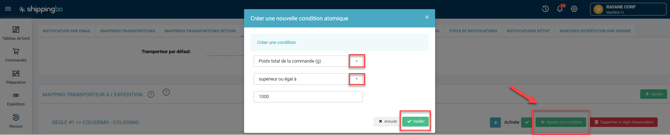
- Don't forget to enable the rule by clicking on Enabled since the rule is disabled by default:

💡 Tip: You can select a default carrier for orders that match no rule:

5. Example of practical use
Context:
You are an e-merchant specializing in textiles and you have orders coming from different regions with specific delivery requirements. For example, you want to:
- Send all orders over 1 kg via Colissimo.
- Ship orders to French overseas territories (DOM-TOM) with Chronopost.
Using the feature:
- You define a first rule stating that all orders weighing more than 1 kg must be sent via Colissimo.
- Then you add another rule so that all orders to French overseas territories (DOM-TOM) are shipped via Chronopost.
Result:
Each time you generate a label for an order, Shippingbo will automatically apply these rules. A 2 kg order to French overseas territories will be shipped via Chronopost, thus meeting your weight and destination criteria without any manual intervention. You save time and reduce the risk of errors in carrier selection.
⚒️ Recommendation:
Before fully using the feature described in this tutorial, we strongly recommend running a test phase with your own settings to check that the result matches your expectations. As the customer remains fully responsible for the actions carried out in the Shippingbo account, these tests are essential to use the tool with complete peace of mind.
To go further 🛫:
FAQ ❔:
- No related FAQ for now.
Contact us 📬:
Questions about this feature? Feel free to write to us here so that we can answer your questions.