.png?width=210&height=40&name=bleu%20et%20gris_Sigle+logo%20SBO%20(4).png)
Benefits of the feature ✨
- Reduced manual interventions and errors: reduces costs and increases productivity.
- Better stock management: fewer overstocks and fewer stockouts.
- Ability to handle activity peaks without a proportional increase in human or material resources.
1. Prerequisites
- Feature available starting from the Pack Pro +.
- Have the Analytics role (or full access) to access the analyses tab.
2. How do AI Analyses work?
The AI Analyses use Shippingbo data exports to:
- Collect your customer and operational data automatically
- Run advanced pre-calculations on your metrics
- Generate insights and personalized recommendations via artificial intelligence
The AI analyzes your historical data to identify trends, detect anomalies and suggest concrete optimization actions.
3. How to access AI Analyses?
To generate an AI analysis, follow these steps:
- Click on Analyses in the Shippingbo left menu
- Select AI Analyses and tools:
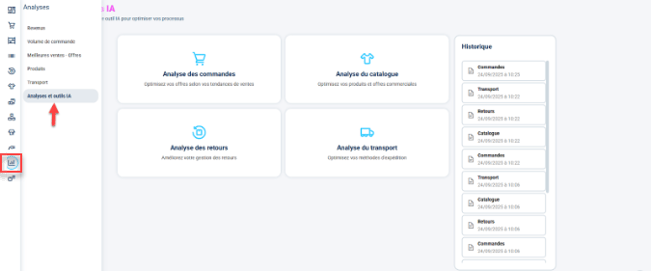
- Choose the type of analysis you want from the 4 available
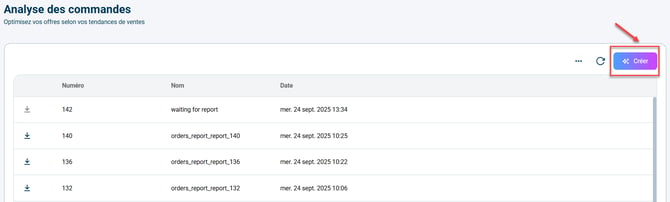
- Click on Create and wait while it is generated
💬 Good to know:
It is not possible to generate a new analysis until the previous one has finished generating.
4. The 4 types of analyses available
In the Shippingbo Intelligence Freemium offer, the AI audit is available, but the number of audits is limited; and the analyzed period per audit is not editable.
➡️ The banner below the title shows the number of AI audit generations remaining this week: The Shippingbo Intelligence Advanced offer unlocks unlimited audits, the analysis period is customizable, filtering options are also available depending on the type of analysis chosen, which makes it possible to refine the study carried out and adapt to the specifics of your business.
Once several AI audits have been generated, you can select at the top of the page which audit to display via the audit history:

⭐ Key points:
- Our AI can make mistakes, check important information.
- Only one analysis can be generated at a time.
4.1 Orders Analysis
Go to the tab Order analysis:
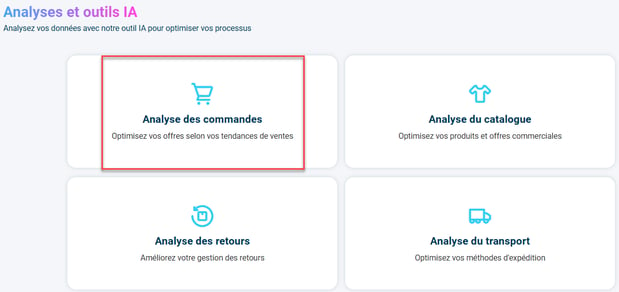
Then click on Create:
In the modal that appears, adjust the analysis period and if needed, you can select specific order sources: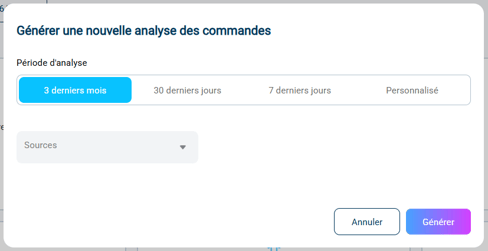
➡️ You will get a complete view of your order activity with:
- Key metrics: Total orders, products shipped, daily average
- Performance: Average products per order, % of single-product orders
- Timing: Best day, peak hour, trends
- Breakdowns: Distribution by day and hour
- Personalized AI insights
For more detail on this audit, it is based on numerous analyses of your orders, starting with general parameters of your sales performance: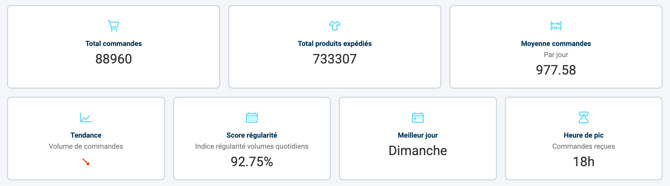
Then it studies the details of sales performance (sales trends by hour of the day, multi-product volume, ...) to detect patterns invisible to the naked eye, such as the concentration of volumes in certain time slots or weekly imbalances for example: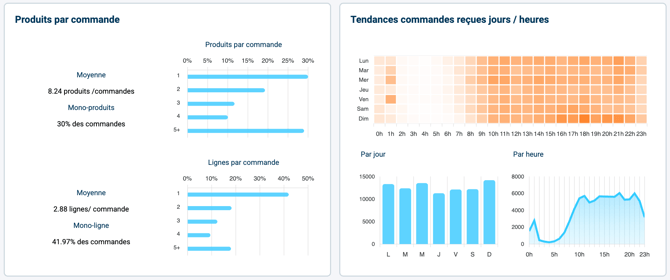
This allows the AI to build tailored advice based on reliable figures: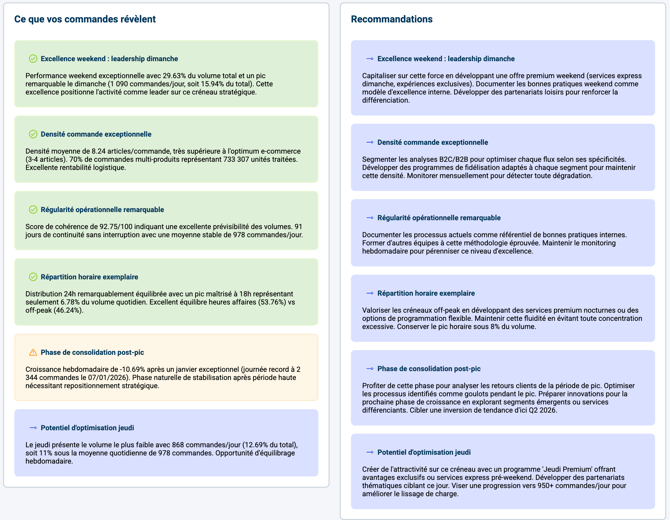
4.2 Catalog Analysis
Go to the tab Catalog analysis: 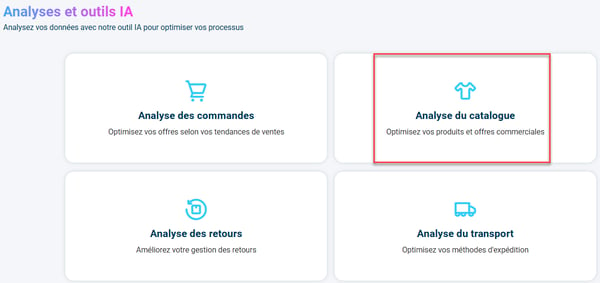 Then click on Create: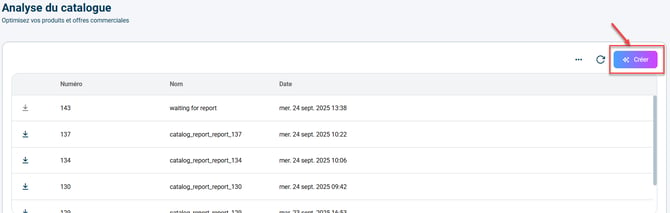
In the modal that appears, adjust the analysis period and the product references to exclude from the analysis (enter the IDs of the products) if needed: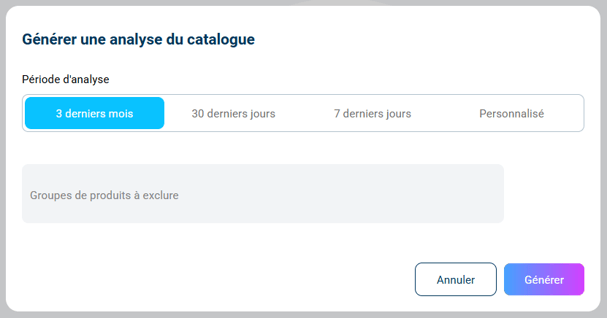
Example: in the list, the user enters three products to exclude from the analysis: 23534234,3446232,146734
💬 Good to know:
You can also select products to systematically exclude from the catalog analysis.
With the Shippingbo Intelligence Advanced offer (available to subscribe here), you have access in particular to the option Exclude from catalog audit, available in the tab Additional information in the details of a Product:
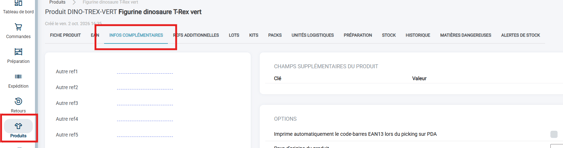

➡️ Optimize the performance of your product catalog in this way:
- Inventory: Number of references, units in stock, tagged products
- Pareto classification: Breakdown of your products by performance
- Dormant stock: Identification of products with no turnover
- Best sellers: Top 10 best-selling products
- Automatic extraction of the sales class of your products
For more detail on this audit, the dashboard starts with general indicators on the number of products in your catalog and their stock: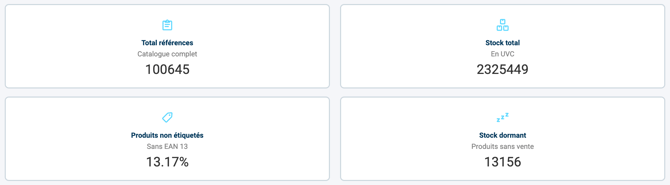
Then it identifies details on the composition of the offer: by reusing the sales classes, the AI highlights the overall turnover rate and the actual availability of your key references:
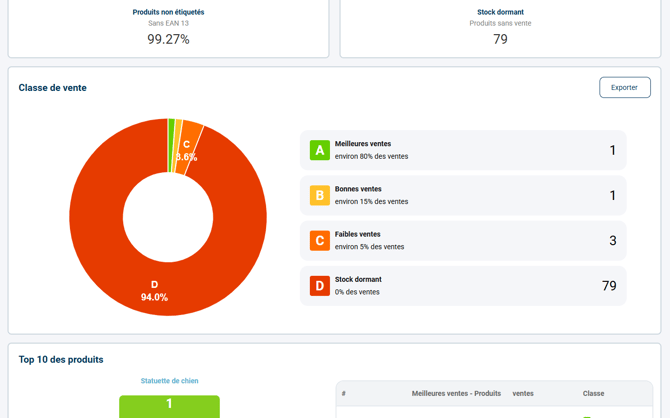
Based on the data analyzed, the AI builds a list of improvement points to optimize your stock (left column) as well as tailored advice for each of these points (right column):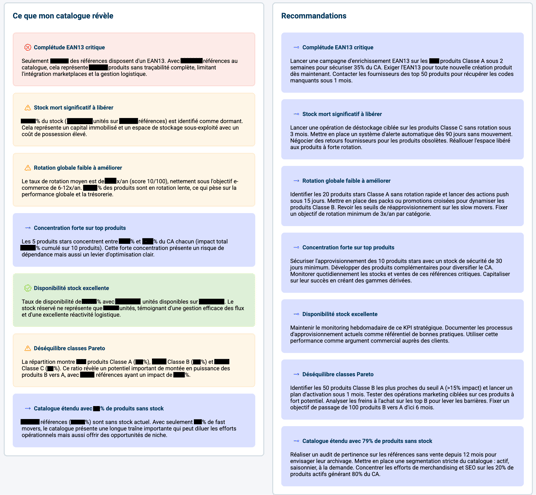
➡️ The tool suggests concrete actions to reduce the capital tied up in classes D and E. For example, it proposes bundle-selling strategies for slow-moving products and warns of stockout risks for the top 10 best sellers in order to secure your revenue.
4.3 Returns Analysis
Go to the tab Returns analysis:
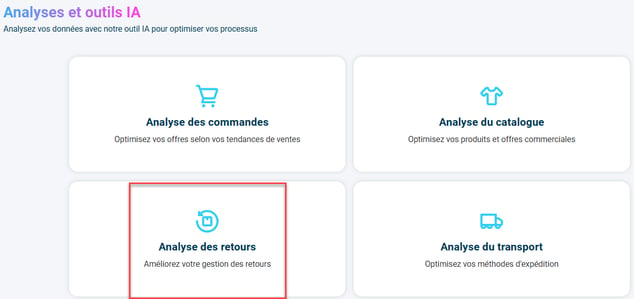
Then click on Create: 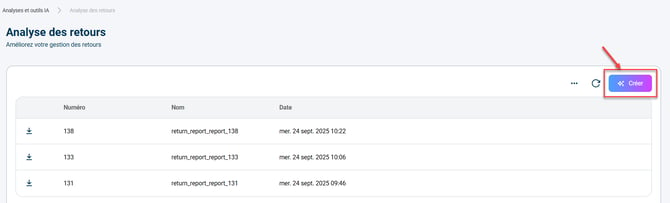
In the modal that appears, adjust the analysis period and if needed, you can select specific order sources: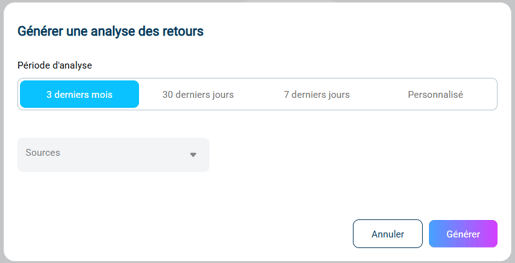
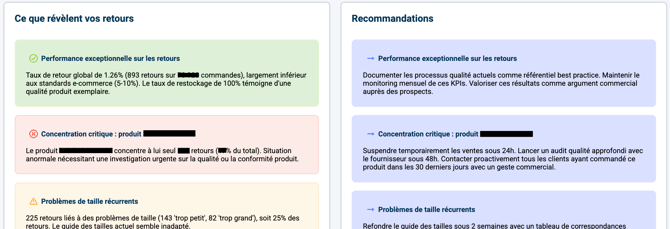
➡️ Here, analyze and optimize the management of your returns:
- Return rate: By order and by product
- Performance: Average processing time, service quality score
- Breakdowns: Return reasons, restockable vs non-restockable
- Geolocation: Map of returns by zone
- Analysis by source and top 10 most returned products
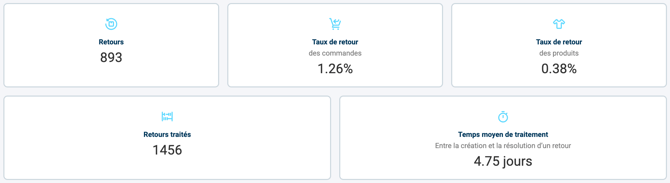
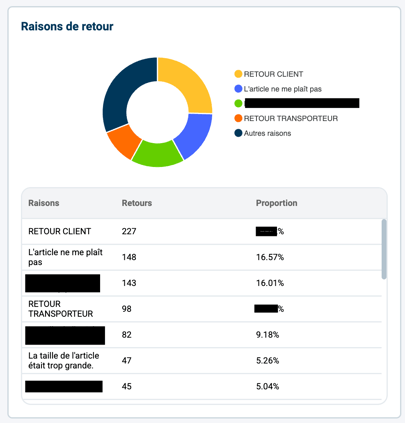
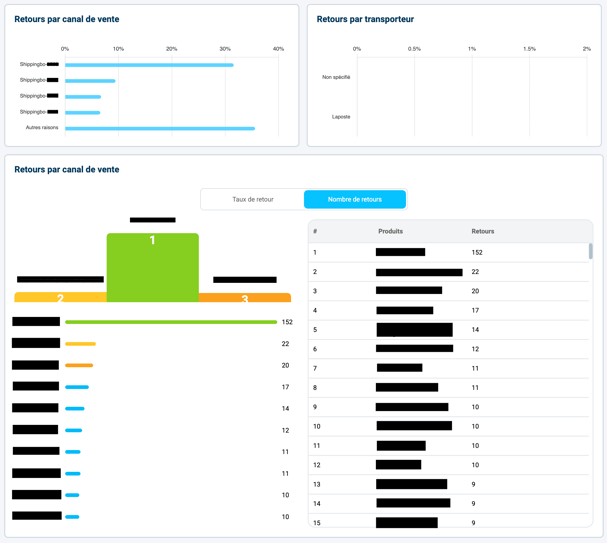
➡️ This section identifies details on the reasons and origins of returns: the AI calculates your overall return rate and segments the causes (customer error, defective product, carrier issue). It precisely identifies the sales channels, carriers and product references that generate the most disputes.
4.4 Transport Analysis
Go to the tab Transport analysis:
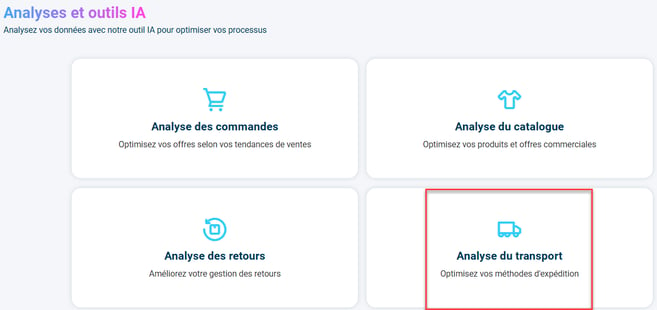
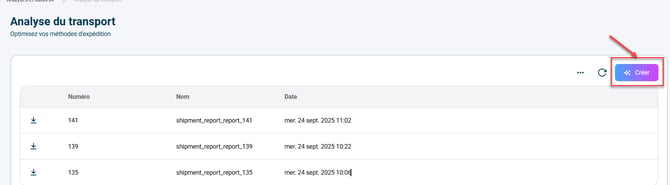
Then click on Create:
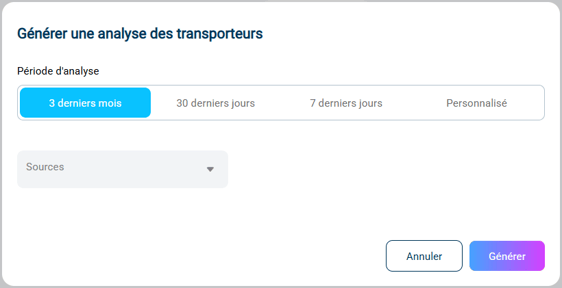
In the modal that appears, adjust the analysis period and if needed, you can select specific order sources:
➡️ Optimize your logistics strategy in this way:
- Volume: Number of shipments, carriers used
- Performance: Average weight, parcels per order
- Breakdowns: By carrier, weight brackets, geographic zones
- Comparative analysis: Comparative performance by carrier
- Top destinations: Most-delivered postal codes
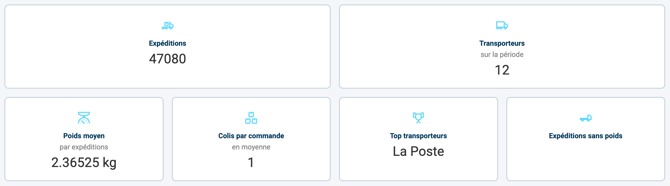
- The first indicators of this section show the number of shipments, the average weight of these shipments, the carrier you use the most and the number of parcels per order:
-
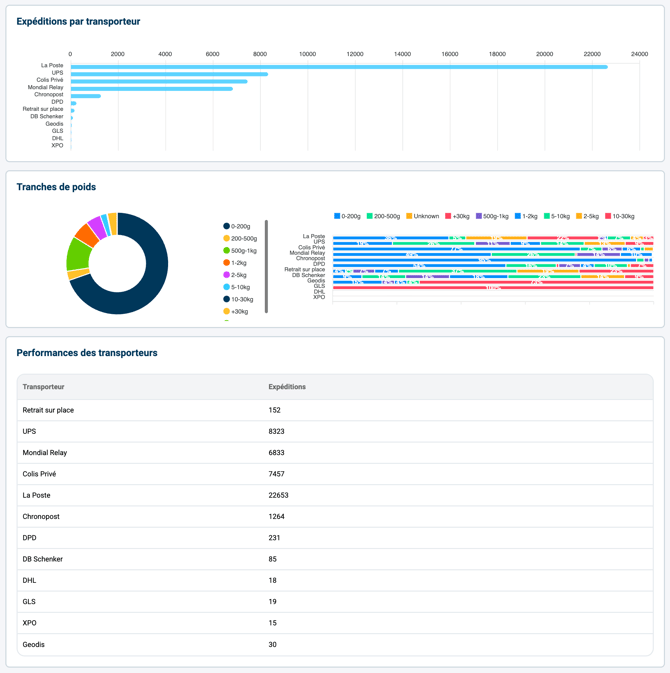
This section identifies details on your shipping performance: the AI analyzes the average parcel weight and the relative performance of each carrier. It highlights the concentration of your shipments in certain weight brackets.
-
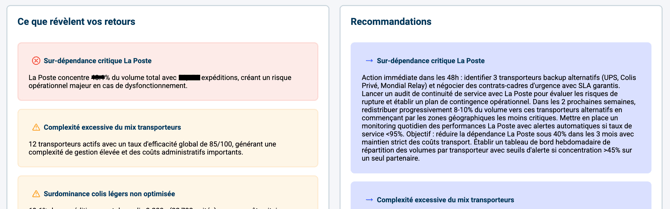
The AI builds tailored advice for your logistics strategy: the tool recommends adjustments to delivery rates by zone, suggests diversifying your carriers to avoid dependence (e.g. over-use of La Poste) and proposes packaging optimizations to move to lower weight brackets and reduce your transport costs.
5. Example of practical use
You are the founder of a natural cosmetics brand, and you notice via the Shippingbo AI Analyses that order peaks occur on Sunday evenings between 8 pm and 11 pm.
You decide to schedule your email and Meta Ads campaigns on Sunday afternoon to maximize conversions right at the right moment: you also adjust your logistics teams to anticipate preparation from Monday morning.
Result: +15% of orders and faster deliveries from Monday.
Useful data: Number of references, Units in stock, Tagged products, Pareto classification.
⚒️ Framework and responsibilities:
Before fully using the feature described in this tutorial, we strongly recommend running a test phase with your own settings to check that the result matches your expectations. As the customer remains fully responsible for the actions carried out in the Shippingbo account, these tests are essential to use the tool with complete peace of mind.
To go further 🛫
Contact us 📬
Questions about this feature? Feel free to write to us here so that we can answer your questions.