.png?width=160&height=30&name=bleu%20et%20blanc_Sigle+logo%20SBO_300dpi%20(2).png)
- Time savings: Automatic generation of customs forms.
- Fewer errors: Compliance ensured with international customs requirements.
- Optimized customer experience: Faster delivery thanks to shipment-ready documents.
2. Prerequisites ✔️
-
This feature is available starting from the Starter + package.
-
You must have an HS (customs) code entered for each product.
3. How does CN23 generation work?
A CN23 is a customs form required to ship goods to certain foreign countries.
This document contains required information such as: product descriptions, their value, their weight, their origin and their HS code.
Example:
If you ship an order to Switzerland containing several products, Shippingbo automatically generates a CN23 with the product data taken from your catalog (HS code, description, weight, etc.).
💡Tip:
For your products to be taken into account in a CN23, the HS code must be entered in your product catalog.
📢 Attention:
The process for preparing slips with an integrated label is not compatible with shipments outside the EU.
4. How to enable automatic CN23 generation?
4.1 Go to Configurations → Logistics → CN23
4.2 Enable the following options as needed:
-
Enable CN23 generation: to generate a CN23 for all carriers, even those that do not offer their own template:

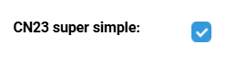
- CN23 Super Simple: groups all products into a single line to simplify the document:
-
Use Shippingbo CN23: standardizes the CN23 with our template.
-
Print invoices only when a CN23 is present.
-
Print proforma invoices (if required for certain countries).
📢 Attention :
If you check CN23 Super Simple, remember to enter a default HS code in the configuration. This avoids an error if several products do not have an HS code in the catalog.
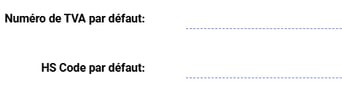
4.3 Set the default values (optional):
-
VAT number
-
HS code
-
Package description
💠 Note:
These values will automatically be carried over into the CN23 if you always ship the same type of product.
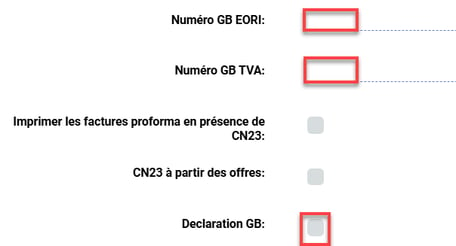
4.4 For shipments to the United Kingdom:
-
Enter an EORI number and GB VAT
-
Enable the GB Declaration option, which adds this statement to the CN23:
"The exporter of the products covered by this document declares that, except where otherwise clearly indicated, these products are of French preferential origin."
5. Putting CN23 into practice
💼 You are an e-commerce retailer and you are shipping an order to the United States via La Poste.
You have already enabled automatic CN23 generation and entered the HS codes for your products.
→ When generating your label in Shippingbo:
-
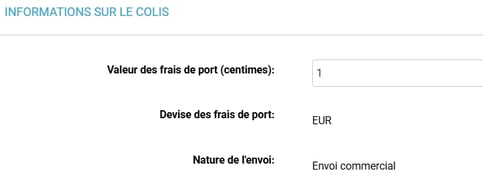
A "Package information" area is displayed. You can edit the information:
-
At the bottom of the page, a CN23 section appears automatically, depending on the configuration chosen:
-
CN23 Super Simple: 1 global product line
-
Standard CN23: 1 line per product
-
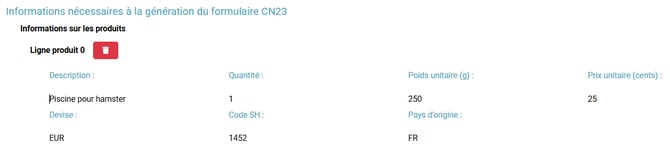
📢 Attention:
A CN23 cannot contain more than 9 product lines. Beyond that, you will need to group certain items together (by product family, for example).
💠 Note:
To find the excl.-tax price information per order line, export your Orders and you will find the information there. To learn how to export your orders, see our tutorial here.
👉 By clicking Print, your label and the CN23 are downloaded.
💠 Note:
You can also find the CN23 in the order's "Shipping" tab, where you can reprint it.
📢 Attention:
If you use several printers (multi-printer), you can send:
-
the label to a thermal printer
-
the CN23 to an A4 printer (customs document)
⚒️ Recommendation:
Before fully using the feature described in this tutorial, it is strongly recommended to carry out a test phase based on your own settings to verify that the result matches your expectations. Since the customer remains fully responsible for the actions performed on their Shippingbo account, these tests are essential to ensure the tool can be used with complete peace of mind.
To go further 🛫:
- Manage a multi-parcel shipment
FAQ ❔:
- CN23: Error generating the label: package product has no unit price
- CN23: Error generating the label: there are 0 quotes, but wanted 1 !
Contact us 📬:
Any questions about this feature? Feel free to write to us here so that we can answer your questions.