.png?width=160&height=30&name=bleu%20et%20blanc_Sigle+logo%20SBO_300dpi%20(2).png)
It is possible in Shippingbo to push the stock levels of one or more products to a marketplace or a website, in order to correct a discrepancy in stock levels, or simply to update stock levels on this marketplace or website.
Here is how to proceed:
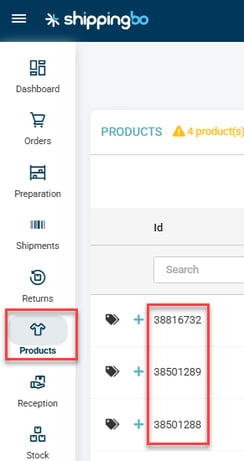
1. In Shippingbo, get the ids of the products for which you want to push the stock levels:
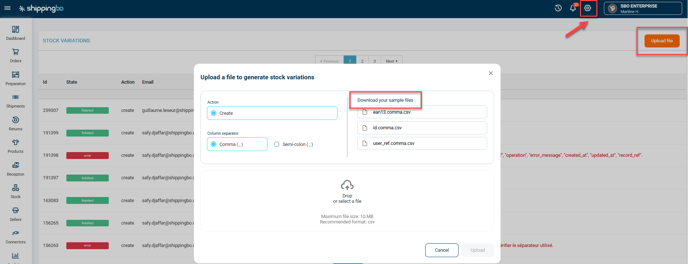
2. Go to Configurations -> File management (or Gestion des fichiers if your Shippingbo is in French) => Stock changes (or Entrée/Sortie de stock) -> click on Upload file and select the sample file:
3. Add the ids in the "id" column and add "0" in the "variation" column:
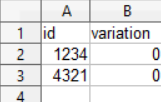
You can keep "location" empty.
➡️ It is important to add only "0" in variation, as you are not adding more stock, you are just pushing the current quantity to update it on your website. If you add "1", it will add +1 to the stock levels.
4. Upload the finished file to Shippingbo and check on the website that the stock levels were correctly updated.
=> If you wish to push the stock levels of more than one product, we recommend doing it in limited quantities each time, no more than 3000 references per file, in order to avoid too many simultaneous calls to the website.
Contact us 📬:
Questions about this feature? Feel free to write to us here so that we can answer your questions.