.png?width=160&height=30&name=bleu%20et%20blanc_Sigle+logo%20SBO_300dpi%20(2).png)
In Shippingbo, you can push the stock of one or several products to the order sources in order to correct a possible stock inconsistency, or simply to update the stocks.
📢 Warning:
To push stock to products, these products must first have been created on the sales channel.
Here is how to proceed:
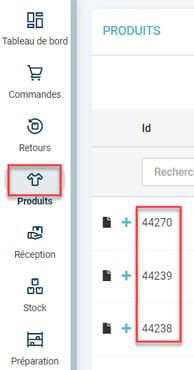
1. Retrieve the ids of the products concerned:
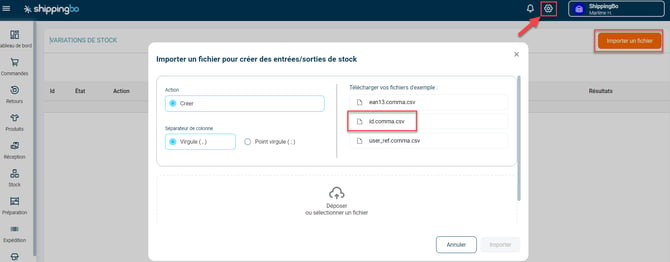
2. Go to Configuration -> File management -> Stock in/out -> Import a file and download the example file id.comma.csv:
3. Enter the product ids in the "id" column and enter the value "0" in the "variation" column:
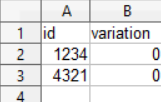
If you do not have a location, you can leave the field empty.
=> you must enter 0 only, because you are not adding stock, you are only pushing the current value. If you enter "1", this will add +1 to the product's stock.
4. Upload the file to Shippingbo and check in the external service that the stock has been updated.
=> If you want to push the stock of several products, we recommend doing it in batches rather than for all products at the same time, so that there are not too many simultaneous calls.
💠 Note:
For Shippingbo packs working with Advanced warehouse, the Stock in/out import is named Send stocks:

Contact us 📬:
Questions about this feature? Feel free to write to us here so that we can answer your questions.