.png?width=210&height=40&name=bleu%20et%20gris_Sigle+logo%20SBO%20(4).png)
- Time savings: Add or edit instructions in bulk.
- Improved accuracy: Inform pickers of product-specific instructions.
- Simplicity: Organize and customize instructions according to your needs.
2. Prerequisites ✔️:
- This feature is available to users from the pack Pro +.
3. How does the preparation information import work?
The preparation information import lets you add custom instructions for each product directly on the slips. These instructions help pickers follow specific rules when preparing orders.
💡 Tip: Organize the instructions by order of importance for better readability. Instructions with a lower number in the column display_order will appear first.
4. How do I activate the preparation information import?
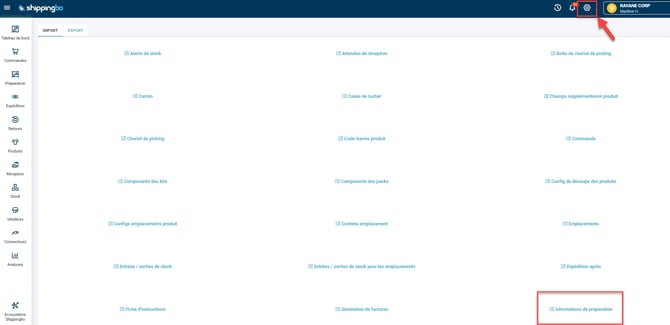
- Go to the menu Configurations -> File management -> Import -> Preparation information:
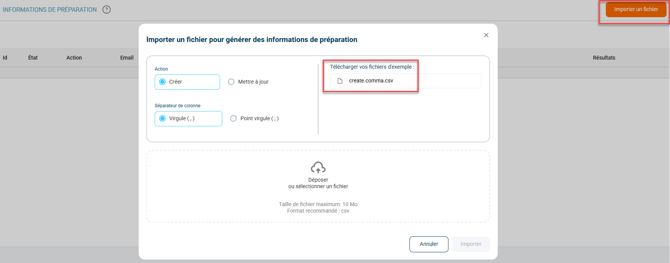
- Click on Import a file and download the sample file:
-
Fill in the file with the following information:
- product_id : ID of the product concerned
- value : enter here the instruction you want to give
- display_order : corresponds to the display order of the instructions. The smaller the number, the higher up the instruction will appear.
- client_ref : optional column, you can enter the instruction reference that your product has internally.
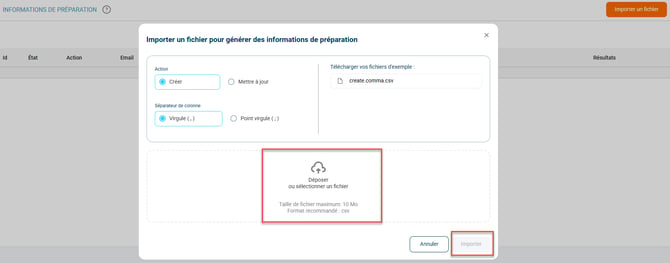
- Once the file is completed, import it by clicking on Drop or select a file, then on Import:
5. Practical example
Context:
You are an e-merchant in the fashion industry, and you want to inform your pickers that certain fragile items must be packed with care. Thanks to the instructions import in Shippingbo, you can add these instructions in bulk on all the associated preparation slips.
How to use the feature:
- Download the sample file from the menu Configurations -> File management -> Import -> Preparation information.
- Fill in the required columns such as product_id, the value (instruction), and the display order.
- Import the file then confirm.
Result:
Once the file is imported, your instructions will be directly visible to pickers.
⚒️ Recommendation:
Before fully using the feature described in this tutorial, we strongly recommend running a test phase with your own settings to check that the result matches your expectations. As the customer remains fully responsible for the actions carried out in the Shippingbo account, these tests are essential to use the tool with complete peace of mind.
To go further 🛫:
- Manage a preparation session
- Preparation session scheduling
FAQ ❔:
- Error when creating a preparation session
Contact us 📬:
Questions about this feature? Feel free to write to us here so that we can answer your questions.