.png?width=210&height=40&name=bleu%20et%20gris_Sigle+logo%20SBO%20(4).png)
As of June 1, 2024, the current version of the UPS system you use will become obsolete and will be deactivated on the carrier's side.
To carry out the necessary migration, please follow these steps:
1: Go to the Connectors tab → Transport contracts → Select the carrier UPS.
2: Enable the “New API” option to make the authentication button appear:
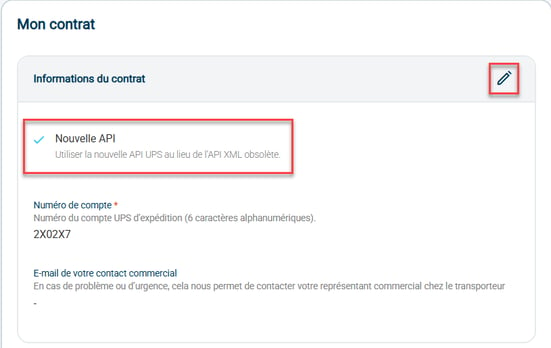
3: Click on the Link/relink account button at the top of the page. Then log in to your UPS account:

4: Check that the Last link date is displayed in the Authentication section:

5: Generate a label on an order, whether or not it has already been shipped, to check that the account is working correctly.
Warning: enabling the “New API” option will cut the contract link, and label generation will then be impossible. Make sure to link the account after enabling the option.
If you encounter any difficulties with this migration, feel free to contact our support team here.
Contact us 📬:
Questions about this feature?
Feel free to write to us here so that we can answer your questions.