.png?width=210&height=40&name=bleu%20et%20gris_Sigle+logo%20SBO%20(4).png)
1. Why is my order stuck in the "partially routed" status in the OMS?
There are several reasons why an order may be stuck in this status. The most common cases are:
-
Digital product included in the order.
-
Partially shipped order (for example, a product was shipped outside Shippingbo).
-
Other specific cases can also cause this block. Feel free to contact our support team if you encounter other situations.
2. How to route a blocked order?
To route an order when it is blocked, notably because of a digital product or a product already shipped outside Shippingbo, follow these steps:
-
Go to the customer OMS and open the details of the order in question.
-
Scroll down to the order's product list and manually remove the stock value of the blocking product.
-
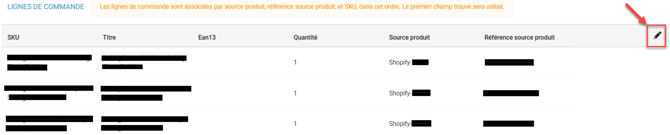
Click on the pencil to edit the product line:
-
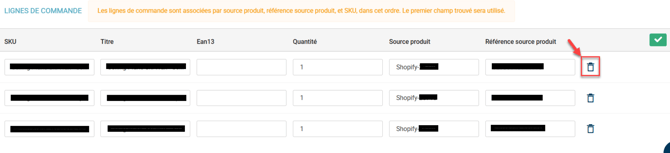
Click on the trash can to delete the stock value, which will go to zero. Don’t worry if the line does not disappear immediately:
-
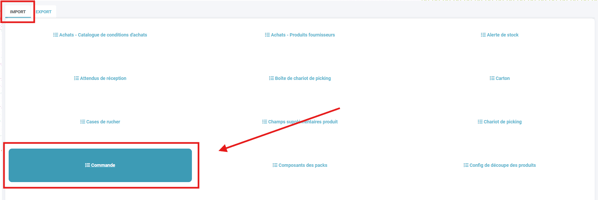
- Once edited, go to the menu Configuration -> File management -> Order import.
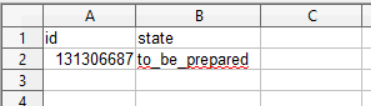
- Change the order status to to_be_prepared (more information on changing an order's status here).
➡️ The order should be routed automatically when the status is changed. If this is not the case, you can force the routing directly from the warehouse tab of the order or run a rerouting import.
3. How to prevent this problem from happening again (Shopify connector example)?
To prevent similar orders from being blocked again:
-
Go to the Shopify connector:
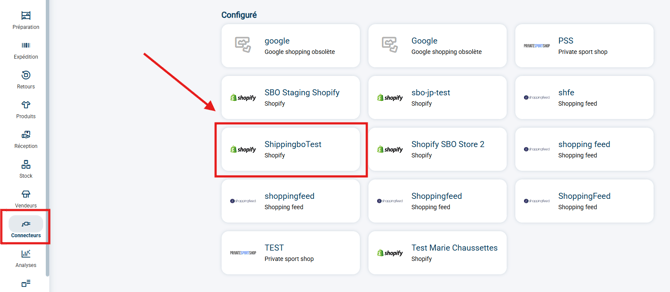
-
In the section Order retrieval, add the SKU of the digital products in the field Exclude by SKU to prevent them from being retrieved in orders:
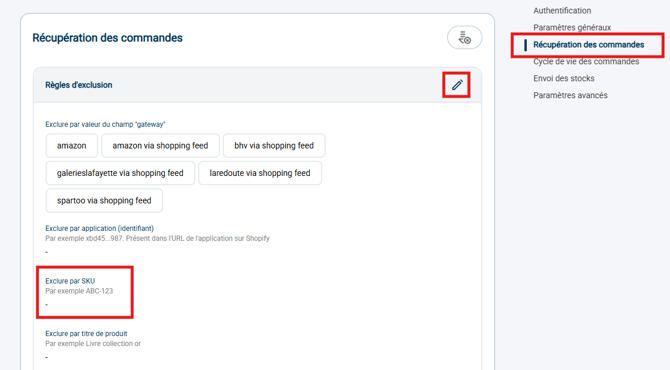
-
Enable the option Use the "To prepare" status for orders appearing as "Partially shipped" in Shopify, which allows partially shipped orders to be retrieved with the status To prepare.

➡️ This should prevent future blocks in the OMS.
Contact us 📬:
Questions about this feature?
Feel free to write to us here so that we can answer your questions.