.png?width=210&height=40&name=bleu%20et%20gris_Sigle+logo%20SBO%20(4).png)
Why access the logs when a label error occurs?
Are you encountering an error when generating the label and wasting time looking for its cause?
It is now possible to easily view the logs of this error. No more tedious searches where you had to identify the transport service, dig through the carrier settings, and search the logs to find the order. You can now get this information instantly and send it directly to your carrier.
How to access these logs in Shippingbo?
Here are the steps to follow:
- On the label generation page, when you print the label, locate the error message:
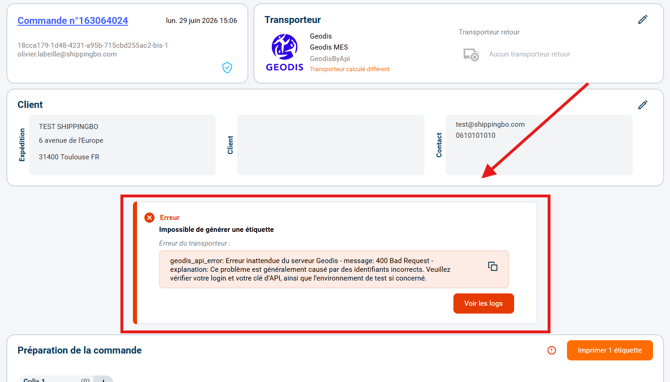
- Click on the dedicated button located right next to the error:
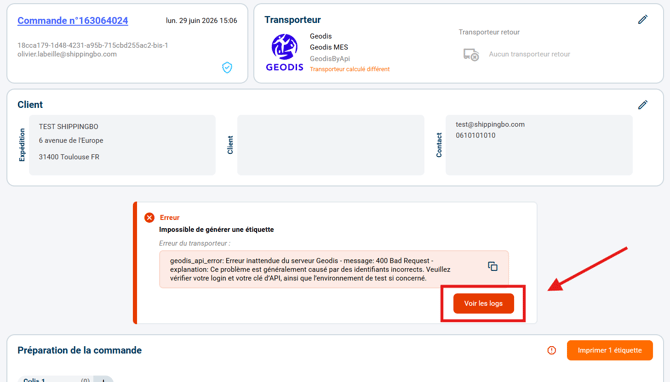
💬 Good to know:
When you click on "Generate a label" on Shippingbo, a label generation request is sent to the carrier. The error displayed during label generation is the carrier's response to Shippingbo's label generation request.
➡️ Therefore, when an error is received during label generation, the matter should be taken up with the carrier by providing them with the logs of the request.
- View, download, and send these logs to your carrier so that the error can be investigated:
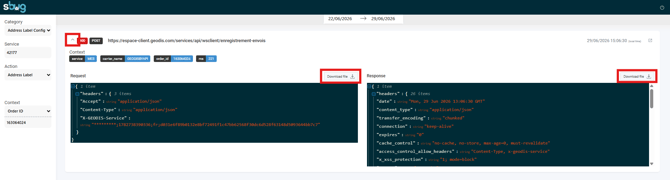
Contact us 📬:
Questions about this feature? Feel free to write to us here so that we can answer your questions.