.png?width=210&height=40&name=bleu%20et%20gris_Sigle+logo%20SBO%20(4).png)
Why exclude certain SKUs?
Do you use Shippingbo as a WMS (stock management system), but some products need to be managed by another logistics tool? You can configure Shippingbo so that it ignores certain SKUs and does not take them into account in order management.
How to exclude SKUs in Shippingbo?
Here are the steps to follow:
-
Access your Shippingbo account.
-
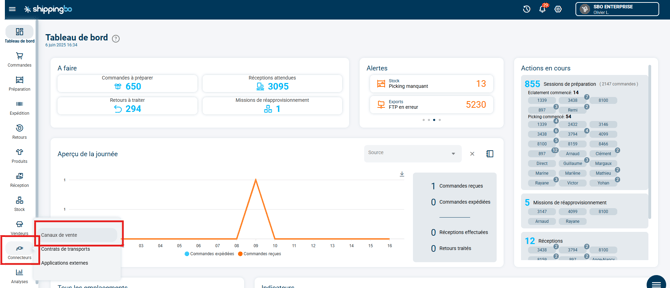
Go to the menu Connectors > Sales channels:
-
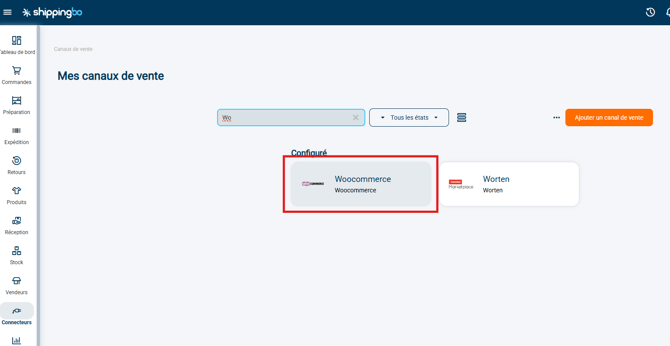
Select the relevant sales source (for example: Woocommerce):
-
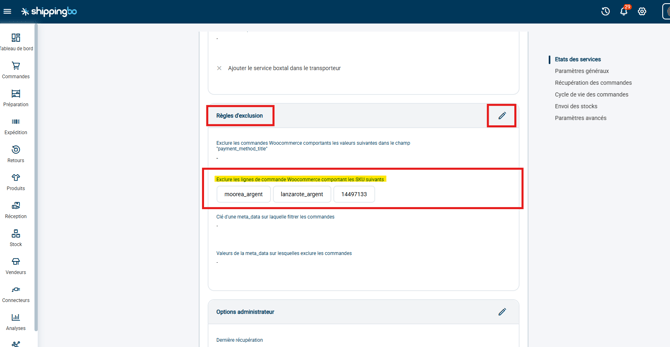
In the field named Exclusion rules, click on the pencil to enter the SKUs to exclude in the field Exclude Woocommerce order lines containing the following SKUs, separated by commas:
⭐ Key point: CMS ≠ Marketplace
-
You can ignore SKUs only on CMS platforms, such as WooCommerce, Prestashop, Shopify, etc.
These platforms are web content management systems that you control directly. -
It is not possible to ignore SKUs on marketplaces, such as Amazon, Cdiscount, Fnac, etc., because they are external online sales sites, with their own rules and less flexibility.
Contact us 📬:
Questions about this feature? Feel free to write to us here so that we can answer your questions.