.png?width=210&height=40&name=bleu%20et%20gris_Sigle+logo%20SBO%20(4).png)
You notice errors in the stock update between Shippingbo and Shopify: the stock of some products is not updated in Shopify, even though it has changed in Shippingbo.
You have manually pushed the stock, following this process: PUSH STOCK TO AN EXTERNAL SERVICE, but this did not correct the stock.
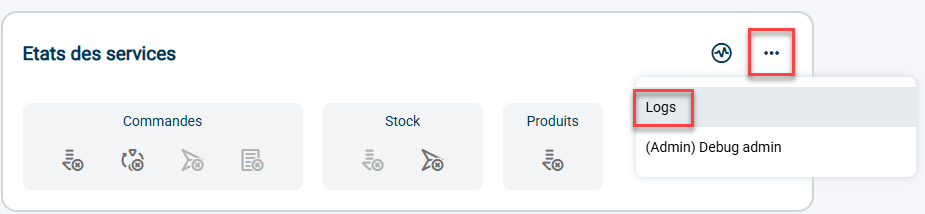
You need to check the status of the connection between Shippingbo and Shopify. To do so, simply go to the "SBUG" interface, by clicking on the three dots below and then on the button Logs:
In Action select Stock Deliverer, and enter the ID of the product concerned in Context:
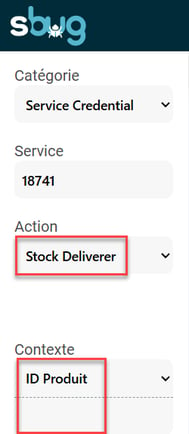
You can then see the results of the stock update sends for the product between Shippingbo and Shopify.
In the example below, we can see that Shopify returns the error 422:
If Shopify returns the error 422, it corresponds to the following error:
"Inventory item does not have inventory tracking enabled"
This error means that the "Track quantity" option is not checked in the backoffice of your Shopify store, which therefore blocks the stock update.
✅Solution:
If you do see a 422 error in the SBUG interface, you need to go to your Shopify backoffice and check the option Track quantity.
Contact us 📬:
Questions about this feature? Feel free to write to us here so that we can answer your questions.