.png?width=210&height=40&name=bleu%20et%20gris_Sigle+logo%20SBO%20(4).png)
1. Set a delivery time per carrier
In Shippingbo, it is possible to define a delivery time per carrier for your orders.
- To do this, go to the configuration of your carrier service for which you want to set a delivery time via the menu Connectors -> Transport contracts -> Details of the carrier in question.
- Then go to the category Preparation and shipping, then enter the desired time in the field Extra preparation time:
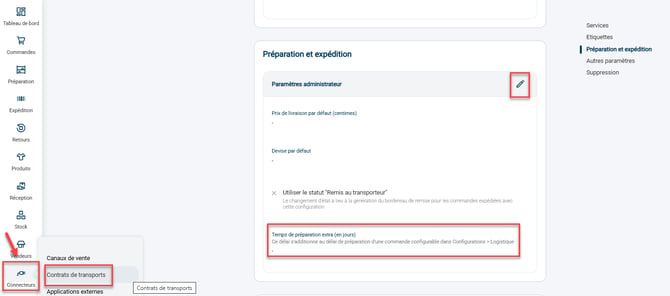
This determines the desired preparation date by subtracting the delivery time, then the preparation time, from the desired delivery date:
Desired preparation date = Desired delivery date – Delivery time – Preparation time.
Consequently, the order must contain a desired delivery date as soon as it is received in Shippingbo, so that the delivery time is taken into account in the calculation of the desired preparation date.
2. Automatic recalculation upon modification
If your customer wants to update their delivery date after the order is created, you can modify the requested delivery date after (earliest_delivery_at) directly in Shippingbo.
When this modification is saved, Shippingbo automatically recalculates the desired preparation date to align with the new requested delivery date.
⭐ Key point:
For this automatic recalculation to work upon modification, you must have previously configured:
-
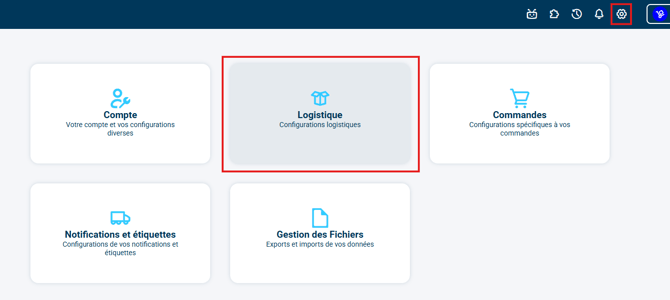
either the Default delivery time (in days), in Configurations > Logistics:

-
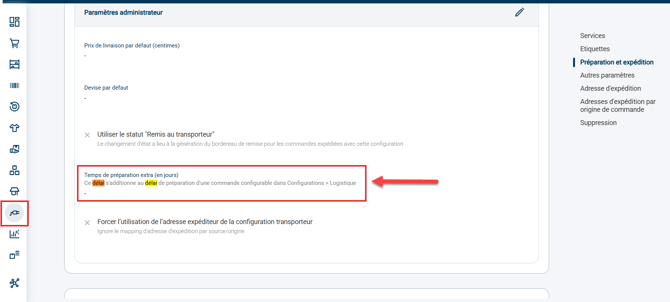
or the Extra preparation time (in days) in the configuration of the carrier associated with the order:
🚩 Special case:
All date values that you manually modify during the update (such as the delivery date, the shipping date or the preparation date) will not be automatically recalculated by the system, in order to preserve your manual entry.
To go further 🛫:
- Configure an order preparation time.
Contact us 📬:
Questions about this feature? Feel free to write to us here so that we can answer your questions.