.png?width=210&height=40&name=bleu%20et%20gris_Sigle+logo%20SBO%20(4).png)
🔐 What is IP address restriction used for in Shippingbo?
The IP address restriction allows you to restrict access to your Shippingbo account to certain specific IP addresses. It is an enhanced security measure, which meets the GDPR requirements for access control, and which gives you better control over user logins.
🎯 Why enable this feature?
-
✅ Strengthen data security (access only from an authorized network)
-
✅ Limit the risks of malicious or unwanted connections
-
✅ Provide clear traceability of user access
-
✅ Meet internal IT security policies
-
✅ Control where your users can log in: remotely, at the office, at the warehouse, etc.
👤 How it works per user
There are two use cases:
1. Targeted restriction per user
-
If an email address is entered in the IP restriction settings and the “IP restriction” option is enabled:
👉 Then only this email address will be subject to the IP access restriction.
Example: You allow a user to log in only from their home, or only from their office.
2. Global restriction (no email specified)
-
If no email address is entered, but the option is enabled:
👉 All users with the “IP restriction” option enabled will be subject to the rule.
Example: You restrict access for your entire team from a secure warehouse network.
⚙️ How do you configure IP address restriction?
-
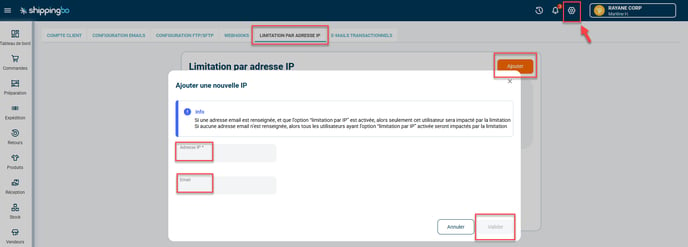
Go to the menu Configurations -> Accounts -> IP address restriction
-
Click on Add to create a new rule
-
Fill in:
-
Theauthorized IP address
-
(Optional) Theemail address of the user if you want to restrict only a specific account:
-
-
Click on Confirm
- To assign several IP addresses to the same user, you must add them one by one, repeating the operation.
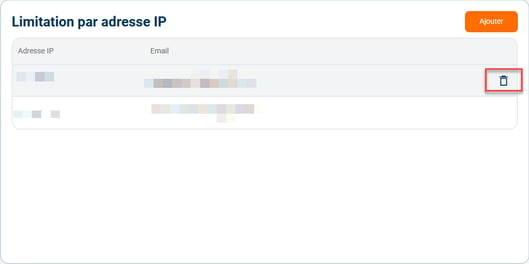
- To delete a restriction, click on the trash icon located to the right of the corresponding line:
⚠️ GDPR & security best practices
-
Raise your teams' awareness so they do not share their access
-
Manage remote-work access with specific rules if needed
-
Only allow secure IP ranges
-
When someone leaves or changes role, immediately disable the associated access
💡 Usage example
You want:
-
Your pickers to have access to Shippingbo only from the warehouse ➡️ enable IP restriction without an email address.
-
Your logistics manager to be able to log in also from home ➡️ add their email address and authorize their home IP address.
❓What happens if a user tries to log in from an unauthorized IP address?
➡️ They will be blocked at the login screen with an error message informing them that they are not authorized to log in from this IP address.
Contact us 📬:
Questions about this feature?
Feel free to write to us here so that we can answer your questions.