.png?width=210&height=40&name=bleu%20et%20gris_Sigle+logo%20SBO%20(4).png)
Why do I want my Sellsy purchase orders as expected receipts?
When a purchase order is created in Sellsy, it must automatically be sent to Shippingbo as an expected receipt in order to prepare for the goods receipt. Without this, the receiving teams have no visibility on current orders and must enter them again manually.
However, depending on your configuration, Shippingbo does not systematically retrieve all the orders present in Sellsy: retrieval depends on the status of the document at the time of synchronization. If the order status is not one of those configured as allowed, it is ignored and no expected receipt is created.
✅ Solution:
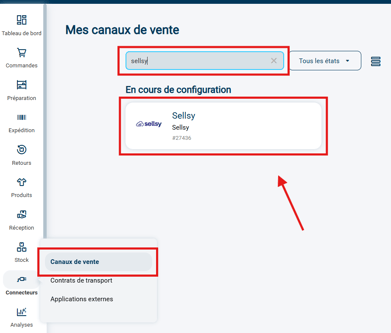
1. Go to the Sellsy connector settings:
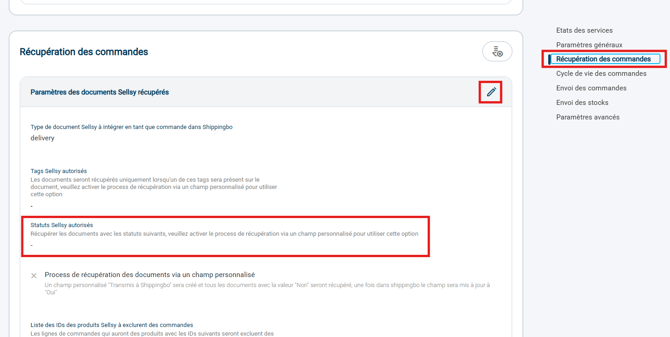
2. Open the Order retrieval section and locate the Allowed Sellsy statuses:
3. Select the Sellsy status(es) from which purchase orders must be retrieved and turned into expected receipts in Shippingbo:
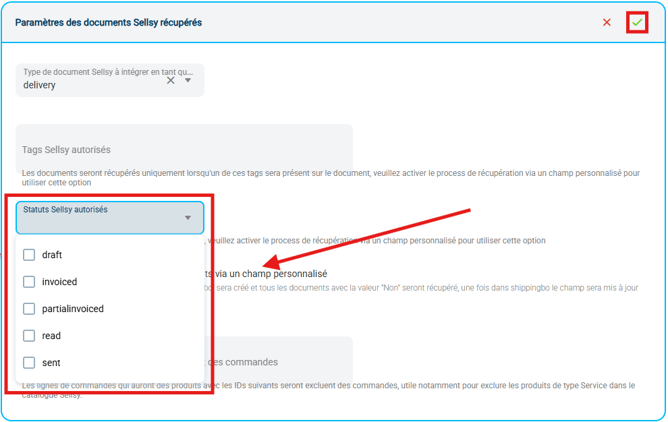
4. Save the configuration.
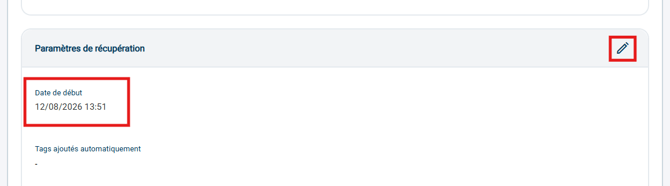
5. Finally, relaunch a synchronization by entering a Start dateearlier than the creation date of the Sellsy purchase order you would like to retrieve as an expected receipt in Shippingbo:
⭐ Key point:
Only orders whose Sellsy status is among the statuses selected in the Allowed Sellsy statuses field are retrieved.
➡️ If no matching status is selected, no purchase order will be turned into an expected receipt, even if it does exist in Sellsy.
Contact us 📬
Questions about this feature?
Feel free to write to us here so that we can answer your questions.