.png?width=210&height=40&name=bleu%20et%20gris_Sigle+logo%20SBO%20(4).png)
- Time savings: Automatic assignment of the shipping address according to the order.
- Flexibility: Makes it possible to display a reseller’s address instead of the logistics provider’s.
- Customs compliance: CN23 correctly completed according to the origin of the order.
2. Prerequisites✔️
-
This feature is available from the Premium + pack.
-
Have CN23 generation enabled in your logistics settings.
3. How does the CN23 configuration by source or origin work?
This feature makes it possible to display a specific shipping address on the automatically generated CN23 according to the source or the origin of an order.
Example: if you ship orders coming from "Cdiscount", you can have the Cdiscount reseller’s address appear instead of your own address.
💡 Tip:
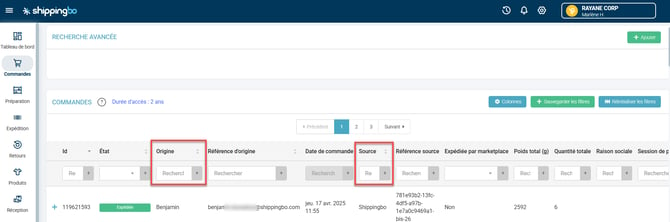
To view the Source and Origin values, go to the Orders page in Shippingbo:
4. How do you activate the CN23 configuration by source or origin?
4.1 Enter your contact address
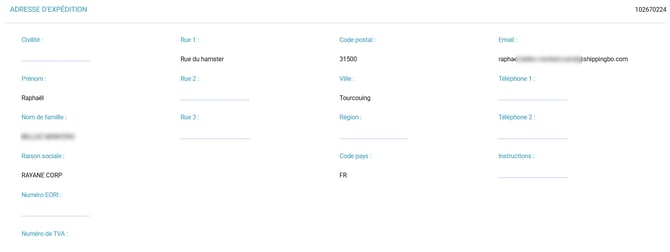
- Go to the menu Configurations → Logistics → CN23, then enter your default contact address in the Shipping address section (you can enter here the address of your warehouse, or that of a partner):
4.2 Enable the associated options:
-
-
Enable CN23 generation
-
Print invoices only when a CN23 is present
-
Super simple CN23
-
Use Shippingbo CN23s
-
Default VAT number
-
Default HS Code
-
Default parcel description
-
Default signature
-
4.3 Add a custom configuration
- Click on Add in the Customizable configuration by source and origin:

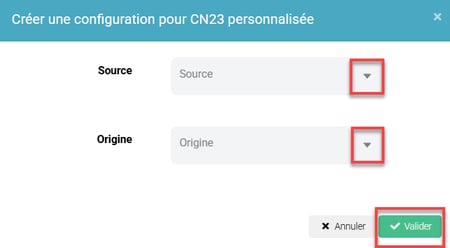
- Enter the value of the source or the origin to target (e.g.: Cdiscount, Shopify, etc.):
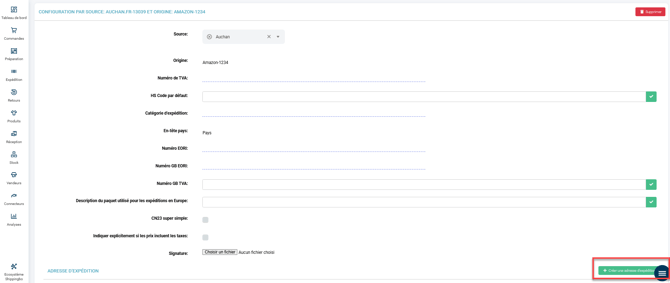
- Then fill in the shipping address fields dedicated to this configuration.
📢 Warning:
Strictly respect capital letters, hyphens and spaces when entering the source/origin values to ensure they are recognized.
5. Practical example
Context:
You are an e-merchant and you work with several marketplaces such as Shopify, Cdiscount or Amazon. You ship from a logistics warehouse, but you want the CN23 document to display each reseller’s address for greater clarity and customs compliance.
Using the feature:
Thanks to the CN23 by source and origin feature, you can configure a different shipping address depending on the source of the order. For example, when an order comes from Cdiscount, the address of your Cdiscount reseller will automatically appear on the CN23, with no manual intervention.
Result:
This allows you to save time, avoid errors, and ensure optimal compliance with customs requirements.
⚒️ Recommendation:
Before fully using the feature described in this tutorial, we strongly recommend running a test phase with your own settings to check that the result matches your expectations. As the customer remains fully responsible for the actions carried out in the Shippingbo account, these tests are essential to use the tool with complete peace of mind.
To go further 🛫:
- Generate a label for an order requiring a CN23
FAQ ❔:
- CN23: Error when generating the label: package product has no unit price
- CN23: Error when generating the label: there are 0 quotes, but wanted 1!
Contact us 📬:
Questions about this feature? Feel free to write to us here so that we can answer your questions.