.png?width=210&height=40&name=bleu%20et%20gris_Sigle+logo%20SBO%20(4).png)
Summary
- Gain in precision The exact dimensions are communicated to the carrier.
- Cost optimization Volume calculation allows for a better estimation of shipping costs.
- Automation : Calculation of volume without manual intervention if the conditions are met.
2. Prerequisites✔️:
-
This feature is available to all Shippingbo users with access to the logistics configuration.
-
THE product dimensions (length, width, height) must be entered in the product sheets.
3. How does the automatic calculation of volumes work?
Shippingbo calculates the volume based on an analysis of the dimensions provided in the product details. It is carried out uniquely if the following conditions are met:
-
The package contains a single product.
-
The product is available in quantity 1.
-
The three dimensions (length, width, height) are all information provided.
Example :
An order with 1x IPOD2014 with all its dimensions entered allows Shippingbo to calculate the volume and include it in the EDI transmitted to the carrier.
➡️Shippingbo then transmits the volume to the IDE via the field: MSE+CGM+
.
Practical examples: How the volume on the label works
✅ Case 1: A single product with all dimensions specified
-
Volume present in the label and the EDI.
-
Retrievable in the order of shipment (Shipping tab)

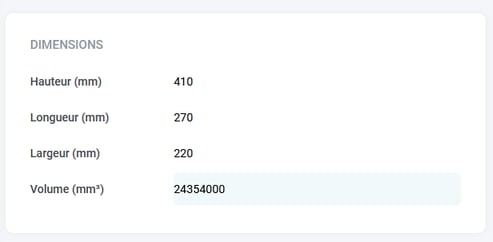
➡️ The shipping label displays all dimensions, and the volume is correctly calculated:
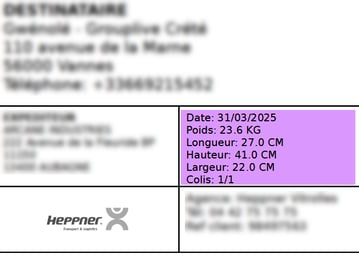
- It is possible to check in Shipping Order the volume in the tab Shipping, and perform an order search by tracking number:
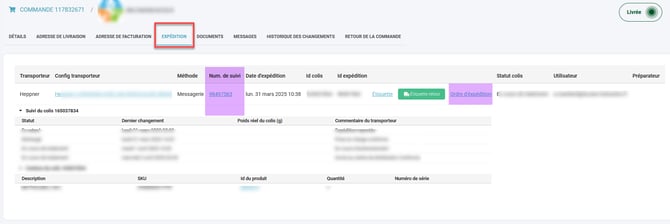
- The MTQ designation, which corresponds to the volume, is clearly visible here:
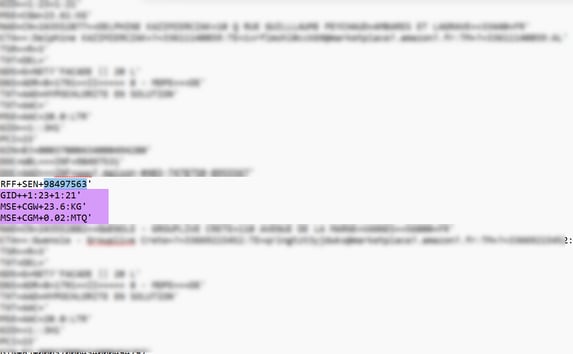
If all 3 dimensions are providedShippingbo automatically calculates the volume in m³, then integrates it into the EDI in the form MSE+CGM+
, just after the line containing the weight (MSE+CGW).
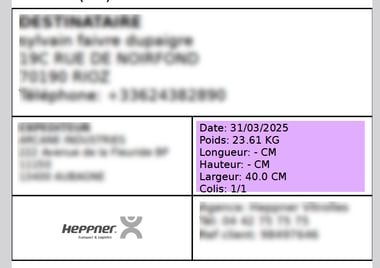
❌ Case 2: Multiple products in one order
- Their dimensions are correctly listed in their product description.
-
The volume is not calculated automatically.
-
The label may contain partial or incorrect dimensions.
➡️ On the shipping label, only the width is indicated, no length or height → therefore the volume will be equal to 0 here.
Cases where the volume cannot be calculated automatically ⚠️
-
The order contains several products.
-
A product is present in quantity greater than 1.
-
Some dimensions are missing from the product description.
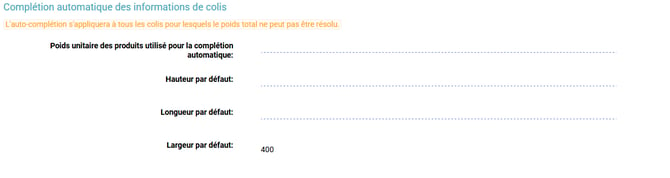
➡️ In these cases, Shippingbo relies on the default values in the menu Configurations -> Logistics -> Logistics -> Automatic completion of package information:
Example :
If only the width is entered by default, Shippingbo cannot calculate the full volume. The volume will then be equal to 0.
4. Activate the feature
1. Check the product dimensions
In your product catalog, make sure youthat length, width, height are well informed.
2. Configure default values (if needed)
Access the menu Configurations -> Logistics -> Logistics
-
Enter consistent values if you are using standard cards.
-
Or leave the fields blank to force manual entry during submission.
📢 Attention :
An incomplete or inconsistent configuration of default values may prevent the correct display of the volume.
5. Example of practical application
Context
An online audio store ships Bluetooth speakers via a carrier. The products are generally bulky, sold individually, and already clearly listed in the Shippingbo catalog with all their dimensions (L x W x H).
Using the feature
When a customer orders a single speaker, the logistics team prepares the package in Shippingbo. For example:
-
There is a single product,
-
in quantity 1,
-
with the three dimensions provided in the product description,
➡️ Shippingbo automatically calculates the volume and integrates it into the shipping label and into the EDI sent to the carrier.
Result obtained
-
The carrier receives the precise weight information and volume (ex.
0.04 m³). -
This avoids additional costs associated with an incorrect declaration.
-
The generated label is correct and the package is shipped without any issues.
-
The seller reduces volume-related billing errors.
💠Note :
Shippingbo does not automatically calculate the volume that if the order contains only one product in quantity 1 with all dimensions specified.
📢 Attention :
In all other cases, Shippingbo relies on the default logistics configurationand may return a zero volume if the fields are empty.
⚒️ Recommendation:
Before fully using the functionality described in this tutorial, it is strongly recommended to performa testing phasefollowing your own parameters to verify that the result meets your expectations. The remaining customerfully responsibleThese tests, based on actions performed on the Shippingbo account, are essential to ensure the tool can be used with complete peace of mind.
To go further 🛫:
- Automate your EDI exports for P30 carriers
Contact us 📬:
Any questions about this feature?
Feel free to write to ushereso that we can answer your questions.